



































Platform > Presentation / UI Layer
Interfaces built for how your people actually work.
The Rayven Presentation Layer turns your data into dashboards, reports + mobile interfaces that your teams actually use - built without code, deployed to any device, and updated in real-time.
No-code builderReal-time dashboardsMobile-firstWhite-label portals


PRESENTATION / UI LAYER - LAYER 04 / 05
The right data, to the right place + in the right format.
An operator on a factory floor needs a different view of data than a finance manager preparing a weekly report.
The Presentation Layer of the Rayven Platform can seamlessly handle all of it from a single platform.
Build once, deploy everywhere. Dashboards, reports, mobile interfaces + embedded views all draw from the same governed data foundation; so every audience sees consistent, accurate, real-time information without the overhead of maintaining multiple tools.
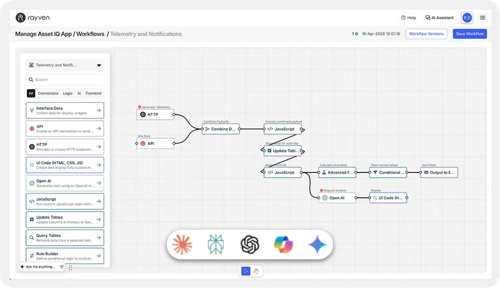
Built by anyone, not just developers
Drag-and-drop builders let any team create and iterate on their own dashboards, reports + forms - without raising a ticket or waiting on a dev.
Any interface, any audience
Responsive dashboards, portals, embedded analytics + mobile-ready views - all from the same builder, all pulling from the same data.
Always real-time, never out-of-date
Every view and action connects directly to the Data Layer - dashboards update as data arrives, reports reflect the latest records, no export step required + instant, automated actions.
Show me performance vs last month
Performance is up 18% vs last month across all tracked metrics.
PRESENTATION / UI LAYER CAPABILITIES
Explore all 9 Presentation / UI Layer capabilities.
Dashboards + Visualizations
Build real-time dashboards with 40+ chart types, KPI tiles + configurable layouts - all connected live to the Data Layer, no exports.
Learn more →Widgets + UI Components
A library of configurable charts, gauges, tables, maps, sliders + control elements that assemble into any interface without writing layout code.
Learn more →Notifications + Alerts
Push, email, SMS + in-app notifications triggered by any data event or workflow outcome with routing rules, escalation paths, and delivery confirmation.
Learn more →Dynamic Reports
Scheduled and on-demand reports built from live data; with custom templates, automated delivery + export to PDF or Excel.
Learn more →Custom Form Builder
Design digital forms for any data capture use case with conditional logic, validation, file attachments + direct routing into Data Layer tables.
Learn more →Screen Flows + Hierarchies
Build structured multi-screen application flows with parent-child navigation, drill-down hierarchies + context-aware layouts for complex interfaces.
Learn more →HTML + JavaScript
Extend any dashboard or interface with custom HTML, CSS + JS for bespoke visualizations, third-party embeds, or anything no-code builders can't cover (now).
Learn more →QR Code Generator
Generate QR codes linked to asset records, form templates, or workflow triggers. Bridge physical assets to digital workflows with a single scan.
Learn more →Conversational Analytics
A natural language interface for querying platform data in plain English embedded directly in dashboards - no SQL or BI expertise required.
Learn more →PROBLEMS THE PRESENTATION / UI LAYER SOLVES
Presentation / UI challenges we solve every day.
We breakdown the same frustrating barriers that come up time and again, including:
Dashboards built by IT or users
Interfaces get designed by people who understand the work or the technology - whoever knows it best. The result is functional, not theoretical.
Reports take days to produce
By the time the report arrives, the decision it was supposed to inform has already been made - or missed.
Data that doesn't travel
Data locked to a desktop doesn't exist where decisions actually get made. The people closest to the problem can't see what's happening.
Every change needs a developer
A new metric, a different layout, a different audience - each one requires a ticket and someone else's backlog. Teams can't move at the speed they need.
One interface for everyone
The same view goes to every user regardless of role or context. Noise drowns out the signal, and important information gets buried under irrelevant data.
Visible data, no path to action
Users can see what's happening but can't respond from the same interface. Every decision means switching tools, losing context + starting over.
FAQs
Rayven Presentation / UI Layer FAQs.
The questions CTOs, IT leaders + transformation directors ask most often about our Presentation / UI Layer.
What is the Rayven Presentation Layer?
The Presentation Layer is Layer 4 of the 5-layer Rayven Platform stack. It is responsible for delivering operational data to the people who need it - as real-time dashboards, scheduled reports, mobile apps, customer portals, and embedded analytics. All views connect directly to the Data Layer, ensuring consistent and up-to-date information across every audience and format.
What types of dashboards can be built with Rayven?
Rayven supports operational dashboards (real-time monitoring views for plant floors and control rooms), executive dashboards (KPI summary views for management), analytical dashboards (drill-down views for business analysis), and customer or partner dashboards (data views shared with external stakeholders via portal). All dashboard types are built using the same drag-and-drop interface and draw from the same governed data foundation.
Does Rayven support mobile access for field teams?
Yes. Rayven provides native iOS and Android mobile applications with real-time dashboard access, push alert notifications, digital form completion, and offline data capture capability for environments with intermittent connectivity. Mobile layouts are configured separately from desktop views within the same builder, so field teams get interfaces designed for small screens and touch interaction.
Can non-technical users build their own dashboards and reports?
Yes. The Rayven dashboard and report builder uses a visual, drag-and-drop interface that does not require SQL, coding, or BI tool expertise. Operational teams can build, edit, and share their own views directly - without raising IT support tickets. Access to data and the ability to publish views to others is governed by the platform's role-based access control.
What reporting capabilities does the Presentation Layer include?
Rayven includes scheduled reporting (deliver a report to defined recipients on a daily, weekly, or monthly schedule), on-demand reporting (run a report at any time and export to PDF, Excel, or CSV), and automated report delivery triggered by conditions (send a report when a KPI breaches a threshold). Report templates are built in the same visual builder as dashboards and pull from the same live data.
Can Rayven dashboards be embedded into other applications or websites?
Yes. Rayven dashboards and reports can be embedded into third-party applications, intranets, customer portals, and websites using iFrame embedding or a JavaScript SDK. Embedded views support single sign-on (SSO) pass-through so users don't need a separate Rayven login. Access to specific data within embedded views is controlled by the same role-based access rules as the native platform.
Does Rayven support white-labelled portals for customers or partners?
Yes. Rayven includes a portal builder that allows you to create branded, multi-tenant portals for customers, contractors, or partners. Each portal user sees only the data and views they are permitted to access. Portals support custom branding (logo, colours, domain), configurable navigation, and a mix of dashboards, reports, and form interactions - all served from the same underlying Rayven data platform.
What chart types and visualisation options are available?
Rayven supports over 40 visualisation types including line, bar, column, area, pie, scatter, gauge, heatmap, geographic map, table, KPI tile, sankey, gantt, and custom HTML panels. Chart properties - axes, colours, thresholds, annotations - are all configurable without code. Custom visualisations can also be added using the embedded HTML panel for specialised use cases.
How does Rayven handle dashboard performance with large or high-frequency datasets?
Rayven's Presentation Layer is designed to remain performant at industrial data volumes. Dashboard queries use the time-series and aggregation capabilities of the Data Layer, which is optimised for high-frequency reads. Dashboards can be configured with refresh intervals from seconds to hours depending on use case. For very high cardinality views, progressive loading and server-side aggregation ensure fast render times regardless of underlying data volume.
How does the Presentation Layer connect to the rest of the Rayven Platform?
The Presentation Layer draws its data from the Data Layer (Layer 2), which provides a clean, governed, queryable data foundation. Automated outputs from the Execution Layer (Layer 3) - alerts, model results, workflow completions - are also surfaced in the Presentation Layer as notifications and updated KPI values. The Security Layer (Layer 5) governs which users can access which data and views. The Presentation Layer is the primary interface through which all Rayven platform capabilities are experienced by end users.
Get the complete, real-time picture you need anywhere, any time.
Build a dashboards, custom UI, or novel, AI-led interface that gives you all the visibility + capabilities you need to execute in the moment, simply.
Join the Shift
Discover the easy way to do something new.
Book a free 30 minute assessment with our team and we'll scope your project, needs + what a solution might look like.