



































Platform > Integration Layer > Custom Integrations
Custom integrations.
Connect any system, protocol, or data source - bidirectional, real-time + without middleware overhead.


CAPABILITY OVERVIEW
Build integrations to anything.
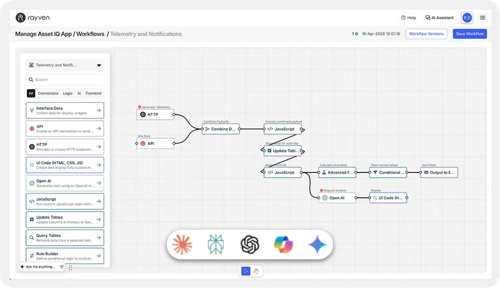
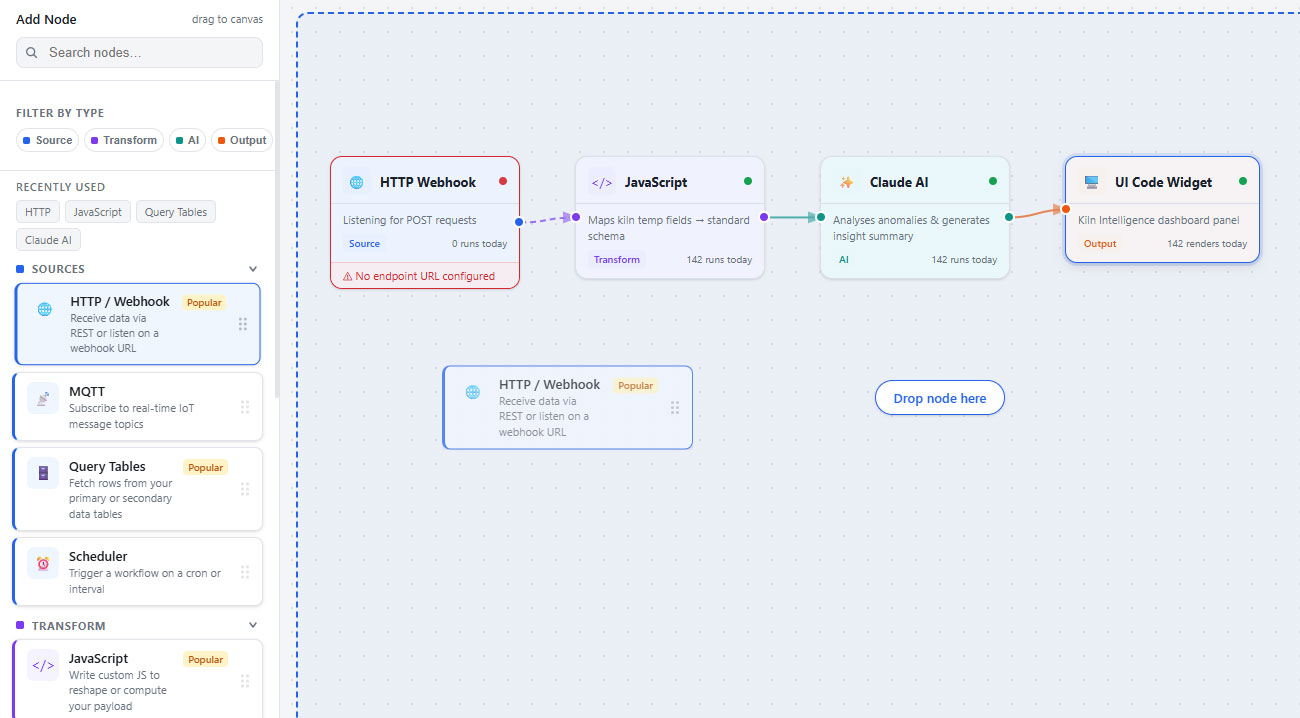
Rayven's custom integration layer covers the full range of inbound and outbound connectivity your stack requires. Every integration runs as a node in the visual workflow builder - no separate integration layer, no additional vendors.
Inbound connections include:
-
HTTP endpoints (POST)
-
REST APIs (GET, POST + PATCH)
-
SQL queries vs. MySQL or MSSQL
-
FTP, FTPS + SFTP file ingestion
-
AWS S3 bucket polling
-
AWS Kinesis stream ingestion
-
AMQP message queue consumption
Inbound connections include:
-
Output to HTTP (webhook)
-
API writes
-
FTP file outputs
-
Email + SMS
-
Direct writes to Modbus or MQTT endpointstion
KEY CAPABILITIES
What Custom Integrations give you.
HTTP + REST API nodes, both directions
Ingest via POST to a Rayven-hosted endpoint, or pull from external systems via GET/POST/PATCH. Supports JSON and XML. Bearer token authentication built-in.
SQL read + write against live databases
Execute queries against MySQL or MSSQL using a configured connection string. Supports reads, writes, custom queries + auto-insertion of payload data into fields.
File ingestion via FTP, FTPS, SFTP + S3
Pull files from FTP/FTPS/SFTP folders or AWS S3 buckets on a configurable schedule. Handles JSON, CSV, XML + compressed formats with configurable encoding.
Outbound webhooks + write nodes
Push workflow data to any external system via HTTP POST, write to FTP destinations, or trigger downstream APIs. Supports JSON, XML, and String output formats.
AWS Kinesis streaming ingestion
Ingest high-volume event streams from AWS Kinesis with configurable polling intervals and UID mapping from a nominated JSON key.
AMQP message queue connectivity
Consume messages from AMQP-compliant brokers. Useful for event-driven architectures where data arrives asynchronously from queue-based systems.
HOW IT CONNECTS: EXPLAINER
Where Custom Integrations fit in the Rayven Platform stack.
Custom integration nodes sit within the integration layer of the platform + act as the first point of contact for all data.
Once ingested via Rayven's custom integrations, data flows into:
-
The Data Layer for storage, transformation + aggregation
-
The Execution Layer for workflow logic, AI processing + automated actions
-
Back out via outbound nodes to source or downstream systems
The entire flow runs within one platform. No middleware. No additional vendors. No handoffs.
USE CASES
How Custom Integrations gets used.
Connecting industrial OT assets with no standard API
A site runs equipment from multiple vendors with no compatible APIs. Rayven's Dynamic Integration Node connects each asset by configuration, mapping telemetry to a unified schema per UID. Data flows into the Execution Layer, triggering threshold alerts + feeding a live operations dashboard - without any custom development.
Legacy ERP data into real-time BI - no warehouse required
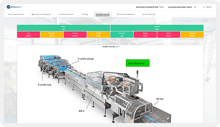
An SQL node polls a production MSSQL database on a five-minute trigger. A Conditional Filter removes unchanged rows, a JavaScript node remaps fields, and clean records write to Cassandra. A Calculate Value node aggregates by team label and feeds a live dashboard updating every 30 seconds - no data warehouse, no manual export.

Partner delivering a white-label data portal for a client with legacy systems
A custom script extracts nightly exports from a client's on-premise ERP with no API access. Data is transformed + loaded into a Rayven pipeline, feeding a branded portal under the partner's own domain. The client sees their own product. Rayven is invisible.
Rayven Custom Integrations FAQs:
What is the difference between the Dynamic Integration Node and a fast-track connector?
Fast-Track connectors are configured for specific software products - HubSpot, Xero, SAP + others. The Dynamic Integration Node is for systems without a standard API - industrial devices, legacy databases, machinery + proprietary hardware. It connects by configuration in the workflow builder, without coding.
When does Rayven deploy custom scripts?
When a system cannot be reached by a fast-track connector, standard protocol node, or the Dynamic Integration Node. Typically: genuinely proprietary protocols, unusual file structures, or legacy assets with no data output. Rayven's team builds and deploys the script - you don't need to write it yourself. See all Integration Layer options.
Can I write back to source systems after processing?
Yes. Outbound nodes sit at the end of any workflow - Output to HTTP, API write, FTP output, SQL write, Output to Modbus + MQTT. Ingest, process, act, write back - all within the Integration Layer.
What data formats are supported?
All standard formats - JSON, XML, CSV, String, compressed files - plus binary and proprietary structures via custom scripts. Data is normalised on ingestion so downstream workflow nodes always work with a consistent schema. Learn how the Data Layer stores and structures data.
Is there anything Rayven genuinely cannot integrate with?
In practice, no. The combination of fast-track connectors, standard protocol nodes, the Dynamic Integration Node, and custom scripting covers every integration scenario we have encountered. If your system has data, there is a path in. See the full Integration Layer.
How does the Dynamic Integration Node differ from custom scripts?
The Dynamic Integration Node connects by configuration - no code written. It covers devices, databases + machinery that have a known interface but no standard API. Custom scripts go a step further, enabling connection to systems with no usable interface at all. See all options in the Integration Layer.
Can Rayven connect IT and OT systems within the same workflow?
Yes. A single workflow can ingest from an MSSQL database, a Modbus-connected PLC, an HTTP API, and a file drop simultaneously. IT/OT convergence is a native capability. Learn more about IoT Devices + Protocols.
How are custom scripts maintained over time?
Scripts are maintained by Rayven's team as part of your ongoing service arrangement. If a source system changes its structure or output, we update the script. This is included in your support agreement - you are not responsible for maintaining integration code.
How quickly can a new custom integration be set up?
For standard protocol + Dynamic Integration Node connections, typically within hours to days of configuration. For custom scripts, most are live within one to two weeks. Our platform-first approach means we are not starting from scratch.
Can I build and manage custom integrations myself, or does Rayven have to do it?
Both. The workflow builder's low-code nodes are configurable by any technically proficient user. For custom scripts, Rayven's team handles development + deployment. As your team's confidence grows, we can hand over ownership of any integration at any point. See all Integration Layer options.
Also in the integration layer:
Fast-Track IT/OT Connectors
1,228+ fast-track connectors across CRM, ERP, BI, AI/LLM services + industrial systems.
File Uploads
Ingest files directly via FTP, FTPS, SFTP + AWS S3, or through manual uploads within the platform.
Forms + Manual Input
Capture structured data from human input via configurable form widgets, feeding directly into workflows.
IoT Devices + Protocols
Native support for MQTT, Modbus, LoRaWAN, SNMP + Raw UDP for edge and industrial device connectivity.
API Endpoints
Expose processed platform data to external systems via authenticated GET endpoints + inbound POST hooks.
AI Connectors
Connect to OpenAI, Claude, Gemini, Cohere + more as workflow nodes for LLM-powered integration + processing.
Streaming Data Connectors
High-frequency ingestion via AWS Kinesis, MQTT + AMQP into Cassandra time-series storage.
Join the Shift
Discover the easy way to do something new.
Book a free 30 minute assessment with our team and we'll scope your project, needs + what a solution might look like.