



































Platform > Data Layer > File Parsing
File parsing.
Extract structured, actionable data from any file type - PDFs, Word docs, CSVs, emails + more - automatically, at the point of ingestion.



CAPABILITY OVERVIEW
Turn files into data, automatically,
Rayven parses any file format at the point of ingestion - converting unstructured content into structured, workflow-ready data without manual extraction or pre-processing.
AI-powered extraction handles complex documents like PDFs and Word files. Regex + mapping rules handle structured formats like CSV and XML.
Extracted data flows directly into storage, workflow logic, dashboards + external systems - no separate parsing tool, no staging step, no manual data entry.
Inbound triggers include:
-
PDF documents
-
Word documents (.docx)
-
CSV + spreadsheet files
-
XML files
-
Email + attachments
-
Images (via AI extraction)
-
JSON files with nested structures
Outbound triggers include:
-
Structured JSON payloads for workflow processing
-
Clean field values for storage in Primary/Secondary Tables
-
Extracted data for dashboards, AI models or external APIs

KEY CAPABILITIES
What File Parsing gives you.
AI-powered document extraction
Pass PDFs, Word documents + text files to an LLM connector node (OpenAI, Claude, Gemini + others) for structured data extraction. The AI reads the document and returns configured fields as structured JSON - no manual template mapping required.
CSV + structured file parsing
Ingest CSV, XML + JSON files from FTP, SFTP or S3 and parse field values into workflow payloads automatically. Configure column mapping, data type conversion + validation rules to ensure structured output regardless of input format variation.
Email + attachment processing
Process emails and extract data from attached files automatically on receipt. Structured content from email bodies or attachments flows into workflows - useful for invoice processing, report ingestion + document-triggered automation.
Regex + validation rules
Apply regex patterns, field validation rules + mapping logic to incoming file data. Validate field formats on ingestion, flag anomalies + reject or flag records failing quality checks before parsed data reaches storage or downstream processing.
Extract JSON Key node
Extract specific values from nested JSON structures within a workflow. Supports deep nesting, wildcard key selection + array handling. Used when ingested files contain complex JSON with required data buried in nested objects or arrays.
Merged file + real-time data pipelines
Combine parsed file data with real-time streams in the same workflow. Merge uploaded file data with time-series data, API responses or Primary Table records - for example, combining a daily CSV report with live sensor readings for unified analysis.
HOW IT CONNECTS: EXPLAINER
Where File Parsing fits in the Rayven Platform stack.
File parsing nodes sit in the Data Layer, processing file content after ingestion from the Integration Layer.
-
Files arrive via FTP, SFTP, S3 or manual upload from the Integration Layer.
-
Parsing nodes extract, validate + structure file content within the workflow.
-
Structured output writes to MySQL or Cassandra for storage.
-
The Execution Layer uses parsed data for workflow logic, AI processing + automated actions.
-
The Presentation Layer surfaces parsed data in dashboards + reports.
USE CASES
How File Parsing gets used.
Automated invoice processing
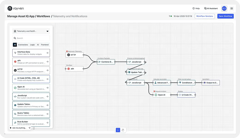
Supplier invoices arrive as PDFs in an SFTP folder. A Rayven workflow picks up each file, passes it to a Claude node for structured extraction of supplier name, invoice number, line items + total. Extracted fields write to a Secondary Table and trigger an approval workflow - no manual data entry required.
Daily report ingestion for a retail BI platform
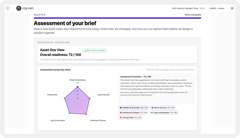
Store managers upload daily sales CSV reports to an S3 bucket. A Rayven workflow ingests each file, maps columns to a standard schema, aggregates by store Label + writes results to a Primary Table. A live dashboard surfaces consolidated sales data within 30 seconds of upload.
Partner building a document processing pipeline for a legal firm
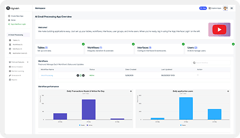
An MSP uses Rayven's AI document extraction to build a contract review pipeline for a legal client. Contracts uploaded to a portal are parsed by a Claude node, key clauses extracted as structured fields + flagged for review if specific conditions are met - delivered as the partner's own product.
Rayven File Parsing FAQs:
What file types does Rayven parse?
CSV, JSON, XML, plain text, binary, and compressed formats (.zip, .gz). Configurable character encoding handles non-standard sets. Proprietary or non-standard structures can be handled via the JavaScript Node or Advanced Function Node. See Data Transformation.
How does Rayven ingest files for parsing?
Files are ingested via FTP, SFTP, S3, manual upload through a Rayven form, or HTTP POST. The ingestion method is set as the workflow trigger node. See File Uploads.
Can Rayven parse files with variable structures?
Yes. When file schemas vary, the JavaScript Node or Advanced Function Node handles dynamic structure detection and field extraction. This supports legacy report exports where column order or naming is inconsistent. Explore Data Transformation.
How does CSV parsing handle headers?
Rayven's CSV parser can detect headers from the first row or use a manually defined column mapping. Multi-row header structures, quoted fields and custom delimiters are all configurable per ingestion node. See Data Layer configuration options.
Can parsed data feed an AI model directly?
Yes. Parsed file content - including extracted text from documents - can feed directly into an AI/LLM node for classification, extraction or summarisation within the same workflow. See AI Models + Training.
Is there a file size limit for parsing?
There is no hard size limit in workflow configuration. Performance on very large files depends on the complexity of downstream parsing and transformation logic. Contact us for high-volume file processing requirements.
Can Rayven parse multiple files in a single workflow run?
Yes. File ingestion nodes can poll a directory and process all new files found in a single execution cycle. Each file is parsed and passed through the workflow independently within the same run. Explore the Execution Layer.
How are parsing errors handled?
The Error Handler and Conditional Filter nodes route parse failures to alternative paths - flagging the file for manual review, triggering an alert or storing the raw file without transformation. See Notifications + Alerts.
Can parsed data write directly to a database table?
Yes. Parsed and transformed data can be written to any Rayven Primary or Secondary Table via Push Row nodes. This makes file-based batch ingestion feed the same unified data structure as real-time sources. See Unified Data Tables.
Does Rayven parse data inside compressed archives?
Yes. The file ingestion node can decompress .zip and .gz files and extract individual files for parsing. The structure within the archive is flattened and each file processed through the workflow pipeline. See the File Uploads page.
Also in the Data Layer:
Unified Data Tables
Structured Primary + Secondary Tables for entity records, metadata + relational data alongside Cassandra time-series.
Data Management
Configure retention policies, inspect workflow payloads, export raw data + manage data lifecycle across the platform.
Data Transformation
JavaScript, Advanced Function + Combine Data nodes for schema mapping, enrichment + normalisation within workflow processing chains.
Real-time Data Processing
Sub-second ingestion + processing of live sensor, device + event data with built-in deduplication + schema validation.
Calculation + Aggregation
Sum, average, count + aggregate across UID or Label over any defined time window - at the point of processing.
AI Models + Training
Train Python ML models on Cassandra time-series data + deploy predictions as real-time workflow steps.
SQL + Cassandra Data Storage
Hybrid storage architecture - MySQL for relational records, Cassandra for time-series + event data.
Join the Shift
Discover the easy way to do something new.
Book a free 30 minute assessment with our team and we'll scope your project, needs + what a solution might look like.