



































Platform > Security, Governance + Hosting Layer > Users, Roles + Access
Users, roles + access.
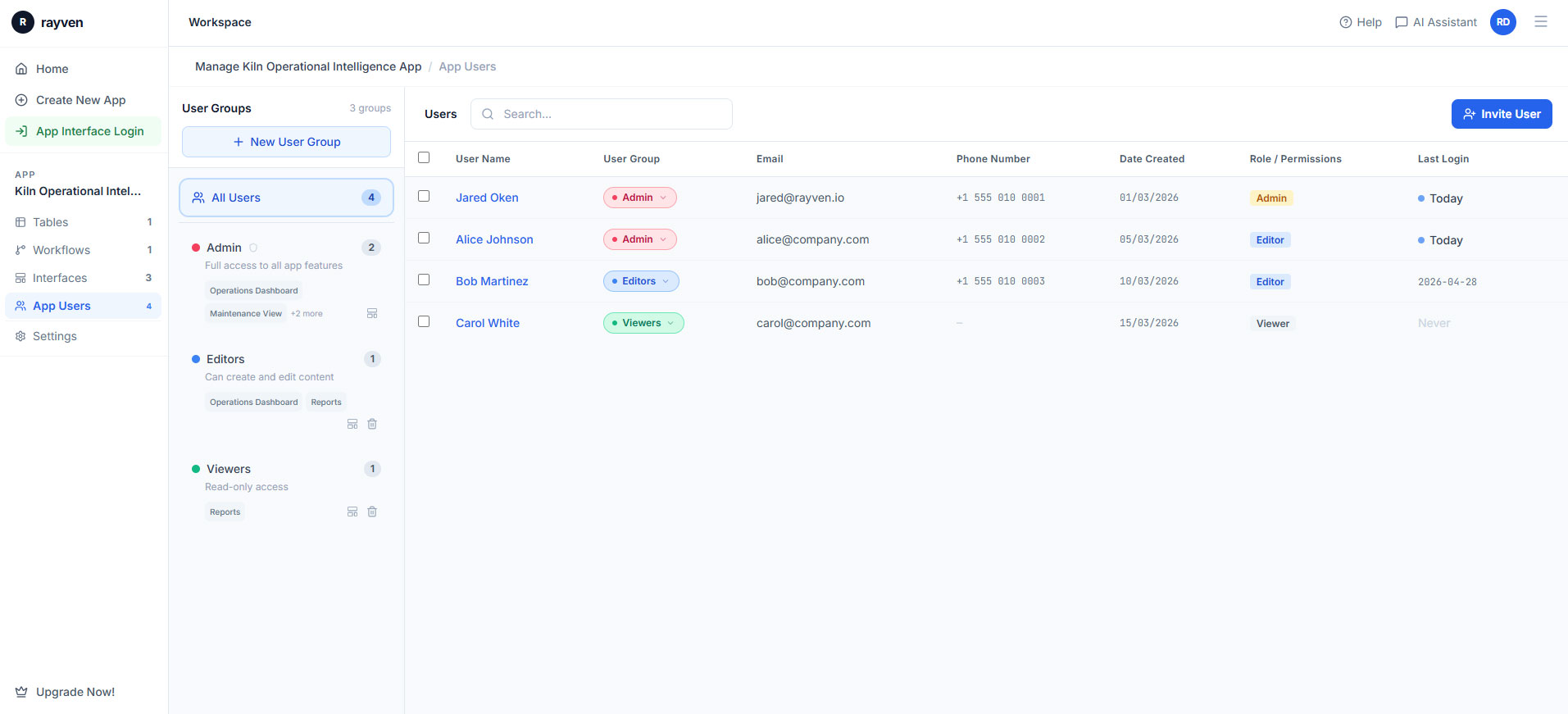
Control who accesses what, across every layer of the platform - role-based permissions, Label-based data scoping, SSO + MFA all in one place.



CAPABILITY OVERVIEW
The right access for every person, every dataset.
Rayven's access control model combines role-based permissions with Label-based data scoping to provide granular, scalable access governance without building separate applications per audience.
Roles control what users can do. Labels control what data they can see. Together, they enable a single application to serve operators, managers, clients + partners with precisely the right level of access - without manual data filtering or separate view configurations per user group.
SSO, MFA + enterprise IdP integrations ensure access governance integrates with your existing identity infrastructure.
Authentication methods supported:
-
Username + password (platform-managed)
-
SSO via OAuth2 / OIDC
-
SSO via SAML (enterprise IdPs)
-
Azure Active Directory / Entra ID
-
Multi-factor authentication (MFA)
-
SCIM provisioning (where configured)
KEY CAPABILITIES
What Users, Roles + Access gives you.
Role-based access control (RBAC)
Define roles that control what users can see + do within the platform. Standard roles include Admin, Builder + Viewer, with configurable fine-grained permissions per workspace. Role assignments determine which capabilities, configuration options + data operations each user can perform.
Label-based data access
Complement role-based permissions with Label-based data scoping. A user's Label assignment controls which data records they can see across dashboards, workflows + API endpoints. Site managers see their site. Clients see their records. Managers see aggregated views. All from the same application.
SSO + enterprise IdP integration
Support for OAuth2/OIDC, SAML + enterprise identity providers including Azure Active Directory/Entra ID. Users authenticate through your existing identity infrastructure. No separate Rayven credentials required for organisations with centralised identity management.
Multi-factor authentication (MFA)
MFA is available across all authentication methods. Enforce MFA for all users or specific roles within a workspace. Adds an additional verification step to the login process, protecting access to operational data + platform configuration.
Workspace-level isolation
User permissions, role assignments + data scoping operate at the workspace level. Different workspaces can have different user sets, permission configurations + data scopes within the same platform instance - supporting multi-team or multi-client isolation.
SCIM provisioning + user lifecycle
SCIM provisioning (where configured) enables automated user account management via your existing identity provider. User onboarding, role assignments + deprovisioning are managed centrally through your IdP rather than manually within the platform.
HOW IT CONNECTS: EXPLAINER
Where Users, Roles + Access fit in the Rayven Platform stack.
Users, Roles + Access is the permission layer governing every interaction with the platform across all other layers.
-
Role assignments determine which Integration Layer connectors, Data Layer tables + Execution Layer workflows each user can view or modify.
-
Label-based data access controls which records each user sees in Presentation Layer dashboards, reports + interfaces.
-
SSO configurations integrate with your organisation's existing identity infrastructure for unified authentication.
-
All user actions - login events, configuration changes, workflow executions + data access - are captured in Audit Trails + Logs.
USE CASES
How Users, Roles + Access gets used.
Enterprise configuring role-based access across a large operations team
An infrastructure operator configures role-based access for 500+ platform users. Operations staff have Viewer access to dashboards + alert controls. Engineers have Builder access to workflow configuration within their assigned workspace. IT administrators have Admin access platform-wide. SSO via Azure AD enables single sign-on for all users without separate Rayven credentials.
Partner managing client access within a multi-tenant deployment
An MSP deploys a white-label platform serving 30 clients. Each client is assigned a Label scoping their data access. Each client has a designated admin managing their own team's users. No client can see another client's data, configuration or user list. The MSP's admin team has platform-wide access.
Regulated industry enforcing MFA + audit-ready access controls
A financial services firm enforces MFA for all users, SSO via their corporate identity provider + role-based permissions aligned with internal data access policies. All access events are logged in Audit Trails + Logs for compliance reporting. SCIM provisioning manages onboarding + offboarding through the firm's existing HR system.
Rayven Users, Roles + Access FAQs:
How does role-based access control work in Rayven?
Each user is assigned one or more roles that define which platform features they can access and what actions they can perform - view, create, edit, delete. Roles are applied consistently across all platform areas. See the Security Layer.
Can custom roles be created?
Yes. Administrators can create custom roles with granular permission sets tailored to specific job functions. Custom roles can combine read, write, and execute permissions across selected platform modules. See Security Layer.
How does label-based access work?
Labels are tags applied to assets, records, and sites. Users and roles are assigned to specific labels so each user only sees data tagged with labels they have access to. This enables fine-grained data scoping without complex query logic. See Governance + Controls.
Can access be restricted at the asset or site level?
Yes. Label-based access scoping means users can be restricted to specific assets, facilities, or geographic regions. A field technician at Site A sees only that site's data and workflows. See Governance + Controls.
How are external or guest users managed?
Guest users can be provisioned with restricted read-only or form-only roles. They can also access specific Screen Flows or dashboards via shareable links without requiring a full Rayven account. See Screen Flows + Hierarchies.
Can users be assigned to multiple roles simultaneously?
Yes. Users can hold multiple roles concurrently, and their effective permissions are the union of all assigned roles. This supports matrix organisations where users have responsibilities across different functional areas. See Security Layer.
Are there pre-built roles available?
Yes. Rayven ships with standard roles including Administrator, Developer, Analyst, Operator, and Viewer. These cover the most common access patterns and can be customised or extended as needed. See Security Layer.
How is user access reviewed or audited?
Rayven logs all access grant, modification, and revocation events. Administrators can run user access review reports at any time showing current role and label assignments for all active users. See Audit Trails + Logs.
Can access be time-limited or set to expire automatically?
Yes. User accounts and individual access grants can be configured with expiry dates. Expired access is automatically revoked without administrator intervention, reducing the risk of stale permissions. See Security Layer.
Does Rayven support user group management?
Yes. Users can be organised into groups and roles and label assignments applied at the group level. Adding a user to a group immediately grants the group's full access profile, simplifying bulk provisioning. See Security Layer.
Also in Security, Governance + Hosting:
White Labelling
Custom domain, branding, colour palette + multi-tenant configuration for client-facing applications.
Deployment + Architecture
SaaS, private cloud, on-premise + Edge deployment options with identical functionality across all models.
Hosting + Management
Managed cloud hosting on AWS + Azure, SLA-backed uptime, automated backups + disaster recovery across all deployment types.
Usage + Metrics
Real-time visibility of platform usage, workflow performance, data volumes + resource consumption.
Enterprise Security
Encryption at rest + in transit, network segmentation, secrets management + compliance-ready governance.
Governance + Controls
Data retention policies, deployment controls, rate limits + environment isolation across the platform.
Audit Trails + Logs
Complete, immutable records of every user action, data change + workflow execution across the platform.
Want to discuss your hosting requirements?
Tell us where your data needs to live and we will walk you through the right deployment option for your environment.
Join the Shift
Discover the easy way to do something new.
Book a free 30 minute assessment with our team and we'll scope your project, needs + what a solution might look like.