



































Platform > Integration Layer > File Uploads
File uploads.
Ingest files from any source - FTP, SFTP, AWS S3 or direct upload - in any format, automatically and at any frequency.


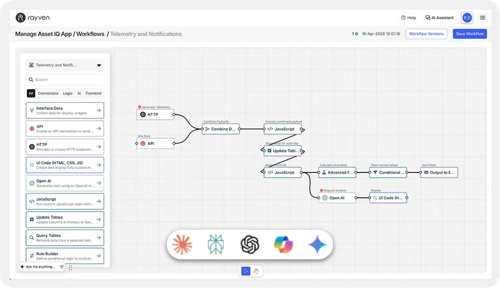
CAPABILITY OVERVIEW
Get files into Rayven workflows without manual handling.
Rayven supports file ingestion from remote servers, cloud storage + direct manual uploads.
Once a file enters the platform it is processed immediately - parsed, transformed + routed to storage, dashboards, AI models or external systems.
Supports JSON, CSV, XML, String + compressed formats with configurable encoding. No manual extraction or pre-processing required before data enters the workflow.
Inbound connections include:
-
FTP server ingestion
-
FTPS (secure FTP) ingestion
-
SFTP (SSH file transfer) ingestion
-
AWS S3 bucket polling
-
Manual file upload via form widget
-
Compressed file handling (.zip, .gz)
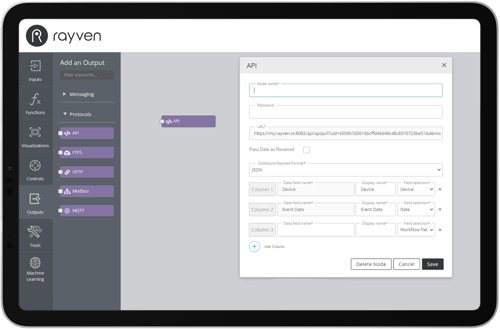
KEY CAPABILITIES
What File Uploads give you.
FTP, FTPS + SFTP
Poll remote FTP, FTPS or SFTP servers at configurable intervals. Supports folder-based file retrieval, configurable encoding + handling of compressed file formats.
AWS S3 bucket polling
Connect to AWS S3 buckets and poll for new files on a defined schedule. UID mapping from a nominated JSON key, configurable polling intervals + JSON, CSV + XML format support.
Manual file uploads
Upload files directly through a Rayven form widget. Files are stored via FTP and immediately available to connected workflows for processing and transformation.
Any format, any structure
Rayven ingests JSON, CSV, XML, String, binary + compressed files. Data is normalised on ingestion so downstream workflow nodes work with a consistent schema regardless of source format.
Automated processing on arrival
Every file ingestion event triggers the connected workflow automatically. Parse, transform, aggregate + route data, or pass files directly to an AI model for extraction and analysis.
Secure transfer protocols
FTPS uses TLS for data-in-transit encryption. SFTP uses SSH-based authentication. Credentials for all file connections are stored securely and never exposed in workflow configuration.
HOW IT CONNECTS: EXPLAINER
Where File Uploads fit in the Rayven Platform stack.
File upload nodes sit in the Integration Layer as the ingestion point for file-based data.
Once ingested, files flow into:
-
The Data Layer for parsing, transformation + structured storage
-
The Execution Layer where workflow logic, AI models + automated actions process the file content
-
Outbound nodes then route extracted data to dashboards, external APIs or downstream systems
Files are processed immediately on arrival - no polling lag, no manual handling.
USE CASES
How File Uploads get used.
Automated report ingestion
A finance team drops reports into an SFTP folder. A Rayven workflow detects new files, parses CSV data, maps fields to a Primary Table + triggers a dashboard update - no manual data entry required.
AI document extraction pipeline
PDF files uploaded to an S3 bucket are picked up by a Rayven workflow, passed to an OpenAI node for structured data extraction, then written to a database - no manual handling at any step.
Partner ingesting client data exports
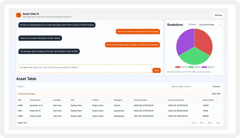
An MSP polls a client's FTP server nightly for operational data exports. Rayven transforms the files, loads clean records into a pipeline + surfaces results in a branded portal under the partner's own domain.
File Uploads FAQs:
What file formats does Rayven support?
JSON, CSV, XML, String, binary + compressed formats including .zip and .gz. Configurable encoding settings handle non-standard character sets. All ingested data flows into the Integration Layer pipeline.
Can Rayven poll multiple FTP/SFTP servers in the same workflow?
Yes. A single workflow can include multiple file ingestion nodes, each connecting to a different server or S3 bucket with independent polling intervals. All data flows through the same Integration Layer pipeline.
How frequently can files be polled?
Polling intervals are configurable - from every few minutes to daily or weekly. The interval is set per node in the workflow builder. For event-driven ingestion see Workflows + Triggers.
Can files be passed directly to an AI model?
Yes. A file ingestion node can feed directly into an OpenAI, Claude, Gemini or other LLM node for document extraction, summarisation or classification - within the same workflow. Learn more about AI Connectors.
Is manual file upload supported alongside automated ingestion?
Yes. The form widget supports file uploads stored via FTP, immediately available to connected workflows. Manual and automated ingestion can run in parallel.
What happens if a file arrives with an unexpected structure?
The JavaScript node and Advanced Function node handle schema transformation within the workflow. Unexpected structures can be normalised before reaching downstream processing steps. Learn more about Data Transformation.
Are file transfers encrypted?
FTPS uses TLS for in-transit encryption. SFTP uses SSH authentication. S3 transfers use AWS-managed encryption. Credentials are stored securely within the platform. See platform security for more.
Can Rayven write files back to FTP or S3 after processing?
Yes. Output to FTP nodes write processed data back to a designated FTP/FTPS destination. For S3 writes, use the Output to HTTP node configured for S3-compatible endpoints. See all Integration Layer output options.
Is there a file size limit?
There is no hard file size limit in workflow configuration. Performance at very large file sizes depends on downstream processing complexity. Contact us for high-volume file ingestion requirements.
Can file ingestion trigger real-time alerts?
Yes. Any file ingestion event can chain into a Conditional Filter or Rule Builder that evaluates file content and triggers email, SMS or webhook alerts based on defined thresholds. See Notifications + Alerts.
Also in the Integration Layer:
Fast-Track IT/OT Connectors
1,228+ fast-track connectors across CRM, ERP, BI, AI/LLM services + industrial systems.
Custom Integrations
Build bespoke two-way integrations via HTTP request nodes, REST API adapters + custom webhook endpoints.
Forms + Manual Input
Capture structured data from human input via configurable form widgets, feeding directly into workflows.
IoT Devices + Protocols
Native support for MQTT, Modbus, LoRaWAN, SNMP + Raw UDP for edge and industrial device connectivity.
API Endpoints
Expose processed platform data to external systems via authenticated GET endpoints + inbound POST hooks.
AI Connectors
Connect to OpenAI, Claude, Gemini, Cohere + more as workflow nodes for LLM-powered integration + processing.
Streaming Data Connectors
High-frequency ingestion via AWS Kinesis, MQTT + AMQP into Cassandra time-series storage.
Join the Shift
Discover the easy way to do something new.
Book a free 30 minute assessment with our team and we'll scope your project, needs + what a solution might look like.