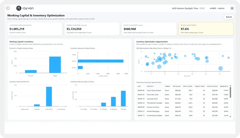
Ask questions about your operational data in plain English and get accurate, context-specific answers - trained on your data, embedded in your dashboards, acting on your workflows.
CAPABILITY OVERVIEW
Your data, answerable in plain English.
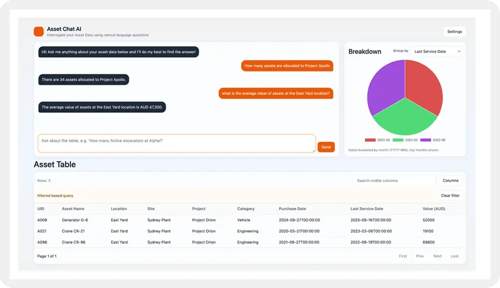
Rayven's conversational analytics capability embeds a GenAI-powered query interface directly into any dashboard or application.
Users ask questions about live operational data in natural language - no SQL, no filters, no export required. The interface is trained on your organisation's specific operational data, systems + historical records using Rayven's LLMOps capabilities.
Answers are grounded in current, governed data - not generic model knowledge. Insights from conversational queries can trigger connected workflows, enabling responses to move from understanding to action in one UI.
Data sources feeding dashboards include:
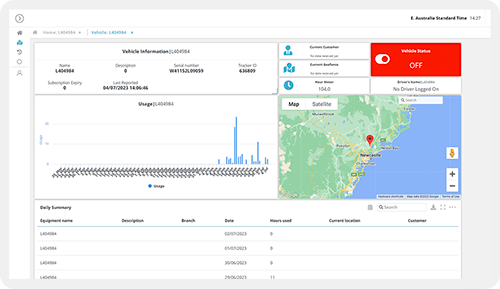
Live Cassandra time-series data (queried on demand by the conversational interface)
Primary + Secondary Table records (MySQL, in-context for LLM responses)
ML model prediction outputs and historical actuals
Workflow execution history and event logs
Custom LLM context from organisation-specific files + data
Natural language outputs surfaced in dashboard interfaces
LLM-generated summaries and recommendations for reporting
KEY CAPABILITIES
What Conversational Analytics give you.
Natural language data queries
Ask any question about your operational data in plain English and receive an accurate, context-specific answer. No SQL, no filter configuration, no data export required. The interface interprets the question, queries the relevant data source + returns a meaningful response grounded in current operational reality.
Custom LLMs trained on your data
The conversational analytics interface is not a generic AI model. LLMs are trained - and continuously updated - on your organisation's operational data, documents + historical records using Rayven's LLMOps capabilities. Every answer reflects your specific context, your terminology + your operational reality.
Embedded in dashboards + applications
Conversational analytics widgets embed directly into any Rayven dashboard or application screen. Users interact with the interface in context alongside the charts, tables + KPI tiles that surface the same underlying data. No separate tool, no platform switch required.
Insight-to-action workflows
Conversational query responses connect directly to Rayven workflows. An insight surfaced via a query - 'which assets are most likely to fail this week?' - can trigger a maintenance workflow from the same interface. Understanding + action occur in one step.
Multiple concurrent interfaces
Deploy multiple conversational interfaces simultaneously for different teams, departments or clients. Each interface can be trained on a different data scope, with Label-based access control ensuring each audience queries only their own data. One platform, many tailored conversational contexts.
Real-time LLM updates
The LLM powering the conversational interface continuously updates as new operational data accumulates in Cassandra + MySQL. Answers reflect the current state of your operation - not a static training snapshot. As your data evolves, so does the model's understanding of it.
HOW IT CONNECTS: EXPLAINER
Where Conversational Analytics fit in theRayven Platform stack.
Conversational Analytics sits in the Presentation Layer as the natural language interface to the full platform data stack.
The conversational interface queries Cassandra time-series data + MySQL table records from the Data Layer in real-time.
LLM training uses Rayven's LLMOps capabilities from the Execution Layer's GenAI + AI Agents capability.
Insight-triggered workflow actions connect to the Execution Layer's workflow builder.
The widget embeds within dashboards + application screens built across the Presentation Layer.
Label-based data scoping from the Security Layer governs which data the interface can query for each user.
Operational intelligence for an industrial site manager
A site manager opens their Rayven dashboard and asks the conversational interface: 'Which assets have exceeded their maintenance threshold this week?' The interface queries Cassandra sensor data + maintenance records from the Secondary Table, identifies the relevant assets + returns a ranked list with supporting data. The manager clicks 'raise work orders' - the insight triggers a maintenance workflow directly from the response.
Self-service client reporting for a managed services firm
An MSP embeds a conversational analytics interface in each client's portal, trained on that client's operational data. Clients ask questions about their own performance - 'what was my peak energy consumption last month?' or 'which sites missed their SLA?' - without needing a data analyst or requesting a custom report. Each client's interface is scoped to their own data by Label assignment.
Compliance investigation for a regulated operator
A compliance officer asks the conversational interface: 'Show me all exceedance events at Site 3 in the last 90 days.' The interface queries the Cassandra event log, returns the matching records with timestamps + severity classifications, and offers to generate a formatted compliance report. An investigation that previously took hours of manual data extraction completes in seconds.
Rayven Conversational Analytics FAQs:
What is Conversational Analytics in Rayven?
Conversational Analytics allows users to ask questions about their operational data in plain language and receive answers as charts, tables or summaries. No SQL or dashboard configuration required. Results are generated dynamically from live Rayven data. See the Presentation Layer.
What data sources can be queried conversationally?
Any dataset stored in the Rayven platform - Primary Tables, Secondary Tables, Cassandra time-series readings and calculated aggregations. The conversational layer queries the same unified data available to all other Presentation Layer components. See Unified Data Tables.
Can non-technical users use Conversational Analytics?
Yes. Conversational Analytics is designed for operational users who know their data but not query languages. Natural language input returns structured, formatted responses without technical configuration. See Dashboards + Visualisations.
What kinds of questions can be asked?
Questions about totals, averages, trends, comparisons, top performers, recent events and threshold breaches - for example "What was the average temperature across all sensors yesterday?" or "Which assets had the most alerts last week?" See Real-time Data Processing.
Can Conversational Analytics answers be saved or shared?
Yes. Query results can be saved as named views or embedded in dashboards for ongoing reference. Frequently asked questions can become standing dashboard widgets. See Dashboards + Visualisations.
Is access to Conversational Analytics controlled per user?
Yes. Users can only query data within their label-based access permissions. A field technician querying asset data only sees their assigned assets - the same access control that governs dashboards applies here. See Security.
Can Conversational Analytics generate reports?
Yes. A conversational query that produces a tabular or summary result can be exported. For scheduled, formatted reporting see Dynamic Reports.
Can it query real-time data as well as historical data?
Yes. The same query returns both current state and historical trend data depending on how the question is framed. Cassandra time-series and MySQL table data are both queryable. See SQL + Cassandra Storage.
Is Conversational Analytics powered by an LLM?
Yes. Natural language queries are processed via a configured LLM. The LLM interprets the question, constructs the appropriate data query and formats the response. See Gen AI + AI Agents.
Can Conversational Analytics be embedded in a custom interface?
Yes. The conversational interface can be embedded in any Rayven-built application as a widget. End users interact with data through a chat-style interface within their operational application. See Widgets + UI Components.