Get the right information to the right people the moment it matters - threshold alerts, condition-based notifications + escalations via email, SMS, webhook + in-app delivery.
CAPABILITY OVERVIEW
Real-time alerts, configured without code.
Rayven's notification + alerting capability fires the moment a defined condition is met - no polling delay, no batch processing.
Configure alerts using the Rule Builder or Conditional Filter node within any workflow. Define the condition, select the delivery channel + specify the recipient.
Alerts fire immediately via email, SMS, webhook or in-app notification when the condition is triggered. Multi-channel delivery, escalation chains + suppression rules are all configurable without writing code.
Data sources feeding dashboards include:
Threshold breach events from Rule Builder or Conditional Filter
ML model prediction outputs (anomaly scores, risk flags)
Output to HTTP webhook (third-party system notification)
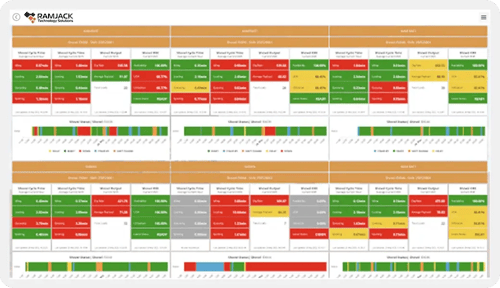
In-app alert widget on dashboard
Downstream workflow trigger on alert condition
KEY CAPABILITIES
What Notifications + Alerts give you.
Threshold + condition-based alerts
Configure alerts using the Rule Builder node with AND/OR condition logic. Define any combination of field values, numeric thresholds, status changes or key presence conditions as the trigger. When the condition is met, the alert fires immediately to the configured channels - no manual monitoring required.
Multi-channel delivery
Every alert can deliver simultaneously via email, SMS, Output to HTTP webhook + in-app dashboard notification. Configure different channels for different conditions - critical alerts via SMS, informational alerts via email, system-to-system alerts via webhook. Recipient lists are configurable per alert.
In-app dashboard alerts
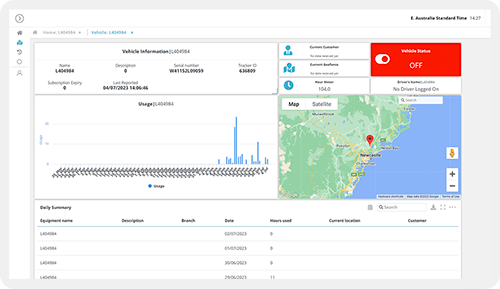
Surface alert notifications directly within a Rayven dashboard interface. Operators see alerts in context alongside the operational data that triggered them - without leaving the platform or checking a separate inbox. Alert acknowledgement can trigger a downstream workflow step.
Escalation + suppression rules
Configure escalation paths when an alert is not acknowledged within a defined time window. Escalate to a different recipient, increase the alert severity or trigger a fallback action. Suppression rules prevent duplicate alerts from firing repeatedly for the same persisting condition.
Scheduled + digest alerts
In addition to real-time event-driven alerts, configure scheduled digest notifications that summarise operational status at defined intervals. Daily shift reports, weekly KPI summaries + scheduled compliance check notifications are all configurable via cron triggers in the workflow builder.
Detect Outage + data gap alerts
The Detect Outage node monitors a data stream and fires an alert if data stops arriving within a configured detection window. Used for monitoring IoT device health, feed connectivity + integration uptime. Recovery detection fires a confirmation alert when the stream resumes.
HOW IT CONNECTS: EXPLAINER
Where Notifications + Alerts fit in the Rayven Platform stack.
Notifications + alerting nodes sit in the Execution Layer as output nodes within workflow chains, and surface in the Presentation Layer via in-app dashboard widgets.
Condition evaluation happens in the Execution Layer via Rule Builder, Conditional Filter + ML model nodes.
Alert output nodes (Email, SMS, HTTP webhook) fire immediately when conditions are met.
In-app alert widgets in the Presentation Layer surface notifications within dashboard interfaces.
Every alert execution is stored in Cassandra for audit + observability.
Predictive maintenance alert for an industrial fleet
A per-asset ML model workflow scores vibration sensor readings and evaluates the prediction against a 85% failure probability threshold using a Rule Builder node. When breached, Output to SMS alerts the maintenance supervisor, Output to Email sends a detailed fault report + an in-app dashboard notification highlights the affected asset. The alert fires within milliseconds of the threshold crossing.
Operational exception alert for a retail chain
A retail operator configures Rule Builder conditions to detect when any store's sales data feed stops arriving. The Detect Outage node fires an alert to the regional operations team via email + a webhook POST to the store management system. Recovery detection confirms when the feed resumes. No manual monitoring of 200 individual store feeds required.
Partner delivering client alert notifications via white-label portal
An MSP configures per-client alert workflows using Label-based routing. When a client's threshold condition fires, alerts route to that client's designated contacts via email + SMS. In-app alert widgets within the branded portal surface the notification in context. Each client receives alerts as if they came from the partner's own monitoring system.
Rayven Notifications + Alerts FAQs:
What notification channels does Rayven support?
Rayven supports email, SMS, push notifications, and webhooks to external systems including Slack, Microsoft Teams, and custom HTTP endpoints. All channels are configurable per alert rule. See the Presentation Layer.
Can I set threshold conditions to trigger a notification?
Yes. Alert rules let you define threshold-based, pattern-based, or AI-scored conditions against any live data field. Notifications fire automatically when incoming data meets the criteria. See Real-time Data Processing.
Can alerts be sent to multiple recipients or teams?
Yes. Each alert rule can target individual users, user groups, or external addresses. A single alert can fan out to as many recipients as needed simultaneously. See Security.
Does Rayven support escalation rules for unacknowledged alerts?
Yes. You can configure escalation chains so that if an alert is not acknowledged within a defined period it automatically routes to a secondary contact or team. See Workflows + Triggers.
Can I use dynamic data in notification messages?
Yes. Notification templates support variable interpolation, so the message body can include live sensor readings, asset names, timestamps, or any field from the triggering data record. See Data Transformation.
What is the difference between a notification and an alert in Rayven?
A notification is any outbound message sent from Rayven to a user or system. An alert is a notification triggered by a defined condition such as a threshold breach or anomaly. All alerts are notifications, but not all notifications are alerts. See Presentation Layer.
Can Rayven send notifications based on AI model outputs?
Yes. If an AI or ML model node in a workflow produces a classification score or anomaly flag, that output can feed directly into an alert rule to trigger notifications automatically. See Predictive AI + Machine Learning.
How do I prevent alert fatigue from too many notifications?
Rayven includes de-duplication windows, alert suppression periods, and rate-limiting options. You can also group related alerts into a single digest message to reduce noise. See Approvals + Exceptions.
Are notification logs stored in Rayven?
Yes. Every notification sent through Rayven is logged with a timestamp, recipient, channel, delivery status, and payload, giving you a full audit trail for compliance and debugging. See Security.
Can I test a notification without a real trigger event?
Yes. Rayven's alert builder includes a send-test function that fires the configured message immediately so you can verify formatting, channel delivery, and recipient routing before going live. See Presentation Layer.