Build real-time operational dashboards that update live, adapt per user role + connect directly to the workflows and AI models powering your operations.
CAPABILITY OVERVIEW
Live data, for the people who need it.
Rayven's dashboard builder puts a real-time operational interface on top of every data source, workflow + AI model in the platform.
Build dashboards using 40+ configurable widgets and a drag-and-drop interface - no design experience required. Full HTML + JavaScript override is available for custom visualisations when the widget library isn't enough.
Every dashboard auto-refreshes every 30 seconds. Data displayed is always the current state of your operation - not a static export, not a scheduled snapshot.
Data sources feeding dashboards include:
HTTP endpoints (POST)
REST APIs (GET, POST + PATCH)
SQL queries vs. MySQL or MSSQL
FTP, FTPS + SFTP file ingestion
AWS S3 bucket polling
AWS Kinesis stream ingestion
AMQP message queue consumption
Outbound connections include:
Button + control widget actions triggering workflow events
Form widget submissions routing data into workflows
Choose from a library of 40+ configurable data visualization widgets - line charts, bar charts, pie charts, scatter plots, tables, KPI tiles, gauges, maps, overlay maps + more. Each widget connects directly to a data source, is configured via a drag-and-drop interface + updates automatically without manual refresh.
Role-based + Label-filtered views
Configure different dashboard views per user role, team, or client. Label-based filtering ensures each user only sees data matching their Label assignment - an operator sees their site, a client sees their own records, a manager sees aggregated views across all. Multiple dashboards can serve the same underlying data in different ways for different audiences.
Real-time 30-second auto-refresh
Every widget on every dashboard updates automatically every 30 seconds from live Cassandra and MySQL queries. No manual refresh, no page reload, no stale data. Dashboards always reflect the current operational state - critical for time-sensitive monitoring, live production oversight + compliance reporting.
Drag-and-drop builder + full code override
Build dashboards using a visual drag-and-drop interface with no coding required. For bespoke visualisations, custom layouts, or advanced interactivity, inject custom HTML + JavaScript directly into any widget. Standard + custom approaches work side by side on the same dashboard.
ML predictions + GenAI interface
Embed ML Chart widgets to display model forecasts, confidence intervals + historical actuals alongside live operational data. Add a conversational analytics interface to any dashboard - trained on your data - allowing users to ask questions about current performance, trends + predictions in plain English.
Mobile-optimised + white-label ready
Every dashboard renders on any device - desktop, tablet + mobile - with automatically adapted layouts. Dashboards are fully white-label configurable: custom domain, logo, colour palette, fonts + imagery. Multi-tenant support allows different branding per client within the same platform instance.
HOW IT CONNECTS: EXPLAINER
Where Dashboards + Visualizations fit in theRayven Platform stack.
Dashboards sit at the top of the Presentation Layer - the interface through which operational users interact with everything the platform produces.
Data flows in from across the platform:
The Data Layer provides real-time Cassandra time-series data + MySQL table records
The Execution Layer feeds workflow outputs, ML predictions + GenAI responses
API endpoints expose external data feeds that dashboard widgets can query directly
Dashboards are not read-only. Dashboard controls - buttons, dropdowns + input fields - trigger workflow events in the Execution Layer, enabling operators to take action directly from the interface without switching tools.
Real-time fleet operations dashboard for a mining site
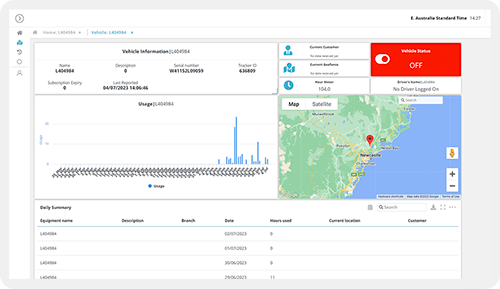
An operations team monitors 500 assets across three sites from a single dashboard. Per-asset KPI tiles show current payload, fuel + cycle count. A map widget displays GPS positions in real-time. An ML Chart widget overlays predicted failure probability per asset. A site-level filter allows the team to switch between sites. Threshold alerts fire to the same dashboard as inline notifications when any asset breaches a limit.
Multi-department BI dashboard for a retail chain
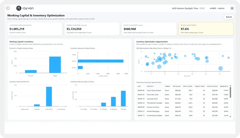
A retail operator builds role-specific dashboards for store managers, regional leads + the finance team - all from the same underlying data. Store managers see their own store's sales, stock + labour data. Regional leads see aggregated performance across their stores. The finance team sees consolidated revenue + cost metrics. Label-based access control ensures no user sees data outside their scope.
White-label client portal with live operational dashboards
An MSP builds a branded client portal with per-client dashboards surfacing operational KPIs, asset status + compliance metrics. Each client accesses their own dashboard via a custom domain with the partner's branding. The underlying platform is shared infrastructure - Label isolation keeps each client's data separate. Clients experience a purpose-built portal; the MSP delivers it without building a custom frontend.
Rayven Dashboards + Visualizations FAQs:
What types of charts and visualisations does Rayven support?
Line charts, bar charts, pie charts, scatter plots, gauges, traffic lights, KPI cards, maps, data tables and status indicators. All widgets connect to any stored Rayven dataset. See Widgets + UI Components.
How frequently do dashboards update?
Dashboard auto-refresh updates all widget data within 30 seconds of new data being written to Rayven. Operational displays reflect real-time conditions without manual page refresh. See Real-time Data Processing.
Can dashboards be filtered per asset or location?
Yes. UID-based filtering means each dashboard can display data for a single asset, a group or all assets simultaneously. Label-based access control ensures users only see data for their assigned entities. See Security.
Can I build dashboards without coding?
Yes. Dashboard layout and widget configuration are done entirely in the Rayven drag-and-drop builder. No HTML, JavaScript or SQL knowledge is required for standard dashboard construction. See HTML + JavaScript for custom widget extensions.
Can time-series sensor data be visualised?
Yes. Cassandra time-series data is directly available to chart widgets. Time range selectors let users explore any retained historical period. Real-time inbound readings update charts as data arrives. See SQL + Cassandra Storage.
Can dashboards display data from multiple sources on one screen?
Yes. A single dashboard can include widgets pulling from different Primary Tables, Secondary Tables and Cassandra series simultaneously. All data is linked by UID so per-asset multi-source views are straightforward. See Unified Data Tables.
Can different users see different dashboards?
Yes. Dashboards are assigned to user roles and label sets. A manager may see a consolidated fleet view; a field technician sees only their assigned assets. Role-based dashboard routing is configurable. See Security.
Can dashboards include drill-down navigation?
Yes. Screen Flows and Hierarchies allow users to navigate from a fleet overview into an individual asset view, from a site summary into a zone detail. See Screen Flows + Hierarchies.
Can dashboards be displayed on public screens or kiosks?
Yes. Dashboards can be configured for read-only public display - manufacturing floor screens, site monitors, customer-facing status boards. Access level and authentication requirements are configurable per dashboard. See Security.
Can I include calculated KPIs alongside raw sensor data?
Yes. Dashboard widgets can display both raw readings and pre-calculated aggregations. KPIs, rolling averages and totals sit alongside real-time metrics on the same screen. See Calculation + Aggregation.