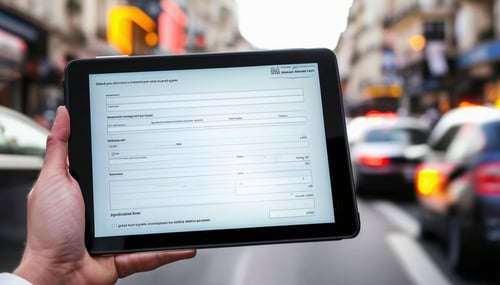
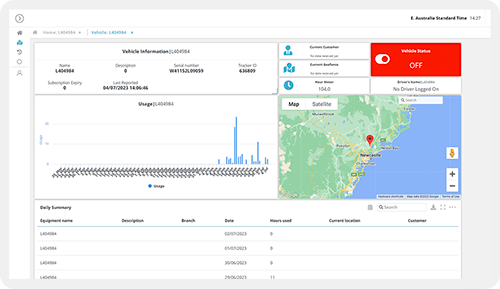
Build operational data capture forms that feed directly into workflows - field inspections, service requests, approvals + more - with conditional logic, file attachments + mobile access.
CAPABILITY OVERVIEW
Every form you need, configured without code.
Rayven's custom form builder creates structured data capture interfaces for any operational process.
Build forms using a drag-and-drop field configuration - text, numeric, date, dropdown, multi-select, file upload + more. Apply validation rules, conditional display logic + role-based field visibility.
Forms are embedded in dashboards or deployed via direct URL or QR code scan. Every submission fires a connected workflow immediately, routing data to storage, processing, AI nodes or automated actions without manual re-entry. No spreadsheets, no paper, no disconnected email chains.
Data sources feeding dashboards include:
Text + numeric field inputs
Date + time selection
Dropdown + multi-select fields
File attachments (images, documents)
Button-triggered workflow events
QR code-initiated form launches
Outbound connections include:
Form submission data routing into connected workflows
Conditional workflow routing based on submitted field values
Automated notifications + alerts on submission
KEY CAPABILITIES
What Custom Form Builder give you.
Drag-and-drop field configuration
Build forms using a visual field configuration interface. Add text, numeric, date, dropdown, multi-select, file upload + button fields without code. Configure validation rules, required field settings + display order per form. Changes deploy immediately - no release cycle required.
Conditional display logic
Show or hide fields based on prior selections using configurable display logic. A dropdown selection can reveal or hide relevant follow-up fields, keeping forms clean + context-relevant for the person completing them. Complex conditional paths are configured within the form builder without JavaScript.
Real-time workflow trigger on submission
Every form submission fires the connected workflow immediately. Submitted data is available to all downstream workflow nodes - storage, AI processing, automation + alerting - within seconds. Approval routing, work order creation, alert dispatch + database writes all trigger automatically from the submission event.
Role-based field visibility
Configure which fields are visible to which user roles. A manager's view of the same form might include approval fields, cost inputs + priority settings that a frontline worker doesn't see. Role-based visibility ensures every user sees only the fields relevant to their task.
File attachment capture
Forms support file upload fields for image capture, document submission + evidence collection. Attachments are stored via FTP immediately on submission and available to connected workflows - for AI extraction, archival, compliance documentation or downstream processing.
Embedded + standalone deployment
Embed forms within Rayven dashboards + application interfaces, or deploy via direct URL or QR code scan for standalone access. Field teams access forms from any browser on any device without app installation. Asset-specific QR codes launch pre-configured forms directly against the correct UID.
HOW IT CONNECTS: EXPLAINER
Where Custom Form Builder fit in theRayven Platform stack.
The custom form builder sits in the Presentation Layer as the human data entry interface connecting directly to the Integration Layer's data ingestion capabilities.
Form submissions enter the platform as workflow trigger events.
Submitted data flows through the Execution Layer's processing + logic nodes.
The Data Layer stores submission records in Primary or Secondary Tables.
The Presentation Layer surfaces form-captured data in dashboards, reports + operational interfaces.
Manual form data and automated data sources merge into the same workflow pipeline.
Digital field inspection for an infrastructure operator
Site inspectors scan an asset QR code, complete a structured inspection form on their phone + submit. The workflow logs the result to a Secondary Table, updates the asset's last-inspection timestamp + triggers an escalation alert if a critical defect is flagged. All within seconds of submission, with no manual data entry or paper processing.
Customer onboarding for a financial services firm
A financial services firm captures customer onboarding data via a Rayven form embedded in their client portal. Role-based field visibility shows compliance questions only to relevant staff. Submission fires a workflow that validates inputs, creates the client record + routes the application to the next stage - no manual re-entry between systems.
Partner building a service request portal for a facilities client
An MSP builds a white-label service request portal using Rayven forms for a facilities management client. Clients submit requests via a branded interface; the MSP's operations team receives structured data in a workflow dashboard with automated routing based on request category. Delivered as the partner's own service management product.
Rayven Custom Form Builder FAQs:
What field types does the Rayven Custom Form Builder support?
Text, numeric, date/time, dropdown, multi-select, checkbox, radio button and file upload. Validation rules (required, min/max, format) can be set per field. See all Presentation Layer capabilities.
Can forms trigger workflows on submission?
Yes. Every form submission triggers the connected workflow immediately. Submitted data is available to all downstream nodes - transformation, storage, AI processing, alerts. Explore the Execution Layer.
Can I add conditional logic to show or hide fields?
Yes. Display logic can be configured to show or hide fields based on prior selections within the same form. This keeps forms clean and context-relevant for the person completing them. See all Presentation Layer capabilities.
Can forms write data directly to Rayven database tables?
Yes. The workflow connected to a form can include Push Row nodes that write submission data to any Primary or Secondary Table, linked by UID. See Unified Data Tables.
Are forms mobile-friendly?
Yes. Rayven forms are browser-based and render responsively on smartphones and tablets. No app installation is required. Field teams access forms via URL or QR code. See QR Code Generator.
Can the same form be used for multiple assets or locations?
Yes. Forms can be launched with a UID parameter via asset-specific QR codes so the same template captures data against different entity records without duplication. See QR Code Generator.
Can forms accept file attachments such as photos?
Yes. File upload fields allow images, documents and other files to be attached. Uploads are stored via FTP and immediately accessible to the connected workflow. See File Uploads.
Can a form submission trigger an alert?
Yes. The workflow connected to a form can include a Conditional Filter that evaluates submitted values and fires an email, SMS or webhook alert if defined conditions are met. See Notifications + Alerts.
Can forms be embedded in an external website or portal?
Yes. Rayven forms can be accessed via direct URL or embedded in any web page using an iFrame widget. See Widgets + UI Components.
Can access to specific forms be restricted by user role?
Yes. Form access is controlled via label-based permissions. Only users with the appropriate role and UID access can view and submit forms for their assigned entities. See Security.