NOW LIVE

Give AI agents all your data.

Discover Rayven MCP

Plug Claude, ChatGPT + Gemini into every system you run - SaaS, IT, OT, IoT, files - anything. Get AI agents that can finally see all your business.

Explore Rayven MCP

Platform > Presentation / UI Layer > Widgets + UI Components

Widgets + UI components.

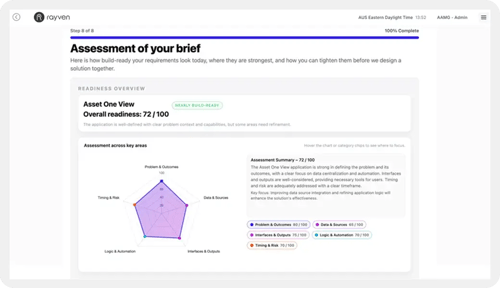
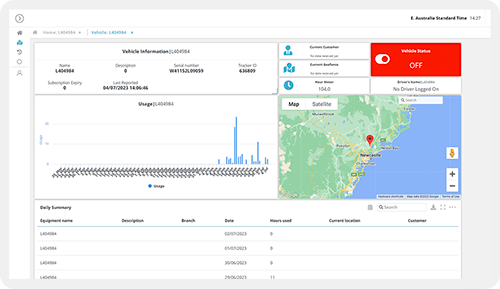
Configure operational interfaces from a library of 40+ ready-to-deploy widgets - drag-and-drop for standard layouts, HTML + JavaScript for anything beyond.

Custom-Analytics-Solution-WebP

CAPABILITY OVERVIEW

Every interface element you need, ready-to-configure.

Rayven's widget library provides every UI component required to build operational dashboards, data capture forms, control interfaces + reporting views.

Each widget connects directly to a live data source, updates on every 30-second refresh cycle + can be configured without code. For bespoke requirements, any widget accepts custom HTML, CSS + JavaScript injection.

Role-based visibility + Label-based filtering control which widgets each user sees and what data they display - without building separate interfaces per audience.

Data sources feeding dashboards include:

  • Cassandra time-series data (per-UID + per-Node)

  • Primary + Secondary Table records (MySQL queries)

  • ML model prediction outputs

  • Workflow execution results + aggregated calculations

  • External API feeds via GET endpoints

Outbound connections include:

  • Button + control widget actions triggering workflow events

  • Form widget submissions routing data into workflows

  • Dropdown selection updating workflow parameters

ESG-Solution-1-500
Asset-IQ-Solution-500
Custom-Analytics-Solution-WebP
Cash-Forecast-Solution-WebP
MyEnergy-Solution-500
AAMG-Solution-WebP
Task-Management-Solution-1040
Line-Performance-500
Collective-Intelligence-Solution-500
EYEMine-Solution-500
Job-Management-500
Inventrory-Optimisation-Solution-WebP
ABC-Solution-500

KEY CAPABILITIES

What Widgets + UI Components give you.

Data visualization widgets

Line charts, bar charts, pie charts, scatter plots, area charts, gauges + KPI tiles - each connecting to a live Cassandra or MySQL data source. Configure axis labels, colour schemes, thresholds + refresh behaviour per widget without writing code.

Table + grid widgets

Display structured records from Primary or Secondary Tables in configurable grid views. Support sorting, filtering, pagination + row-level drill-down. Role-based access controls which records each user can view, edit or interact with.

Map + overlay widgets

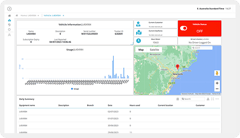
Plot asset locations, sensor positions or operational events on interactive map layers. Overlay data from multiple sources - live GPS feeds, zone boundaries, environmental readings - in a single geospatial view. Useful for distributed asset monitoring + field operations.

Control widgets

Button, dropdown + text field widgets connect directly to workflow triggers. Operators interact with connected systems from within the interface - sending commands, updating records or launching processes without leaving the dashboard.

ML Chart + predictive widgets

Display ML model predictions, confidence intervals + historical actuals alongside live operational data. Purpose-built for predictive maintenance, demand forecasting + anomaly detection dashboards where forecast context and current readings need to appear in the same view.

Role-based + Label-filtered configuration

Configure visibility, data scope + interaction permissions per widget using role + Label assignments. The same dashboard layout serves multiple audiences - operators, managers, clients - each seeing only the data and controls relevant to their role and Label.

HOW IT CONNECTS: EXPLAINER

Where Widgets + UI Components fit in the Rayven Platform stack.

Widgets sit in the Presentation Layer as the building blocks of every user-facing interface in the platform.

  • Data flows into widgets from the Data Layer (Cassandra time-series + MySQL tables) and the Execution Layer (workflow outputs, ML predictions, GenAI responses).

  • Control widgets trigger workflow events in the Execution Layer - allowing operators to act directly from the interface.

  • Form widgets collect data that routes back through the Integration Layer into workflows.

Every widget operates within the same platform used for data ingestion, processing + automation - no separate frontend infrastructure required.

USE CASES

How Widgets + UI Components get used.

Operations dashboard for a distributed industrial fleet

A site operations team builds a dashboard using KPI tiles (per-asset load + fuel), a map widget (GPS positions), an ML Chart widget (predicted failure risk) + button controls (manual alert acknowledgement). Each widget connects to a different data source but updates on the same 30-second cycle. Label filtering scopes each operator's view to their own site.

interface builder data

Multi-role client portal for a financial services firm

A financial services firm configures a single dashboard layout serving advisors, managers + compliance staff. Advisors see their own client table widgets. Managers see aggregated KPI tiles across their team. Compliance staff see audit trail tables. Role + Label assignments route each user to the correct data view automatically.

ESG-Solution-2-1040

Partner building a white-label asset monitoring product

An MSP uses Rayven's widget library to build a branded asset monitoring portal for clients. Map widgets, KPI tiles + threshold charts are pre-configured per client using Label-based data scoping. Each client accesses a polished interface under the partner's own domain - with no visible Rayven branding.

Collective-Intelligence-Solution-500

Rayven Widgets + UI Components FAQs:

What types of widgets are available in Rayven?

Rayven includes charts, gauges, tables, maps, status indicators, KPI tiles, image panels, HTML panels, and input controls such as dropdowns and sliders. All widget types are configurable without code. See the Presentation Layer.

Can I build a custom widget in Rayven?

Yes. The HTML + JavaScript widget type lets you write custom markup and logic rendered inside a sandboxed panel. This covers specialised display requirements not met by the standard widget library. See HTML + JavaScript.

Can widgets display real-time data?

Yes. Widgets connect directly to Rayven data streams and refresh at configurable intervals, from sub-second polling for live sensor feeds to longer periods for aggregated metrics. See Real-time Data Processing.

Can I embed a Rayven widget in an external page?

Yes. Individual widgets can be exported as embeddable iframes, allowing you to surface specific data panels inside third-party portals, intranets, or public-facing websites. See HTML + JavaScript.

How do I connect a widget to a data source?

In the widget configuration panel, select a data table, query, or live stream as the source, map fields to the widget's display properties, and apply any filters or aggregations needed. See Unified Data Tables.

Can widgets be made interactive?

Yes. Many widget types support user input - such as date range pickers, filter dropdowns, and button triggers - that update the displayed data or initiate a workflow action. See Workflows + Triggers.

What styling options are available for widgets?

Each widget has a styling panel covering colours, fonts, borders, padding, background, and conditional formatting rules so you can match your brand and highlight important values automatically. See Dashboards + Visualisations.

Can a widget trigger a Rayven workflow?

Yes. Button and input widgets can be configured to fire a workflow trigger on user interaction, enabling actions like submitting a command, requesting a report, or logging a manual event. See Workflows + Triggers.

Are there pre-built widget templates?

Yes. Rayven ships with a template library covering common operational and industrial use cases, including equipment status boards, energy consumption tiles, and production throughput gauges. See Dashboards + Visualisations.

Can widgets display data from multiple sources?

Yes. A single widget can pull from multiple data tables or streams simultaneously, enabling composite views such as a chart overlaying real-time sensor data with historical averages. See Unified Data Tables.

Ready to build your perfect UI?

Show us what you need to see and we will show you how Rayven surfaces it - in real-time, for the right people.

Join the Shift

Discover the easy way to do something new.

Book a free 30 minute assessment with our team and we'll scope your project, needs + what a solution might look like.