





















Platform > Execution Layer > Workflows + Triggers
Workflows + triggers.
Build, automate + orchestrate any process - from a simple alert to a multi-step AI-driven pipeline - using a visual drag-and-drop builder with no-code and full-code options.


CAPABILITY OVERVIEW
Automate anything.
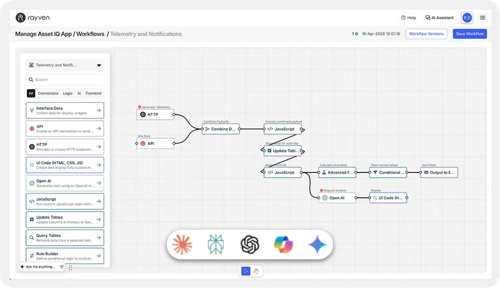
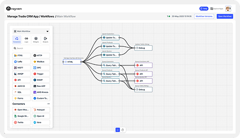
Rayven's workflow builder is the execution engine of the platform.
Every integration, data transformation, AI model, alert, control command + output action runs through a workflow. Build workflows by dragging nodes onto a visual workbench and connecting them in sequence or in parallel - no programming knowledge required.
For complex logic, JavaScript + custom code nodes are available at any step. Plus, every workflow execution is stored in Cassandra with a full payload history, giving full observability, auditability + debugging capability at every node.
Workflows can be triggered by:
-
Event-driven data arrival from any connected system, sensor or API
-
Scheduled time-based triggers (interval, cron or daily)
-
Per-UID iterative execution across all
-
Primary Table records
-
Per-Label execution grouped by site, region or customer
-
Webhook or inbound HTTP POST from any external system
-
File arrival events from FTP, SFTP or S3
-
Manual actions triggered from within an app interface
Workflow outputs can be:
-
Output to HTTP (webhook / API call)
-
Output to Modbus (write to connected device)
-
Output to MQTT (publish to broker)
-
Output to Email
-
Output to SMS
-
Output to FTP (file write)
-
Update Tables (write to Primary or Secondary Table)
-
Output to API (POST or PATCH to external system)
-
Trigger downstream workflow
-
Push data to dashboard widgets + visualisations
KEY CAPABILITIES
What Workflows + Triggers give you.
Visual drag-and-drop workflow builder
Build workflows by dragging nodes onto the workbench and connecting them in any configuration. Seven node types cover the full workflow lifecycle: Input, Logic, Transformation, Visualisation, Controls, Output + Tool. No-code for standard logic; custom code available at any node for advanced requirements.
Flexible trigger configuration
Every workflow starts with a configured trigger. Trigger on data arrival, on a schedule, per-UID across a Primary Table, per-Label, on a webhook event or on a manual action from an app interface. Triggers are configurable without code - each defines what starts the workflow and, for per-UID + per-Label modes, which records are in scope.
Conditional Filter + Rule Builder logic
The Conditional Filter node is the only node that stops or allows data to progress through a workflow - blocking payloads that don't meet defined conditions. The Rule Builder evaluates conditions using AND/OR logic and writes outcomes to the payload. Both work together with the JavaScript node for complex multi-step business logic.
JavaScript + full custom code
The JavaScript node enables full custom code at any point in a workflow - field remapping, conditional calculations, multi-step logic + payload construction. Custom code sections are also available within individual nodes for highly specific requirements. No restrictions on logic complexity.
Branching, loops + parallel execution
Workflows support branching logic, parallel execution paths, loops + sequential chaining. Handle complex multi-step processes including approvals, escalations, SLAs, retries, dead-letter queue management + circuit breakers. Multiple AI nodes can operate at different points in the same workflow.
Full observability + audit trail
Every workflow execution is stored in Cassandra with a complete run history, payload state at each node + operator notes per action. The Inspect Data tab surfaces payload detail at any node in real time. Full metrics, logs + traces support debugging, compliance + operational monitoring across all workflows.
HOW IT CONNECTS: EXPLAINER
Where Workflows + Triggers fit in the Rayven Platform stack.
Workflows sit at the centre of the Execution Layer - they are the mechanism by which everything else in the platform connects and acts.
Data flows in from the Integration Layer and the Data Layer as workflow triggers or payload inputs. Once a workflow fires:
-
Logic nodes evaluate + route the data
-
AI + ML nodes score, classify or generate outputs
-
Output nodes write to databases, send alerts, control devices, call APIs or trigger other workflows
-
Visualization nodes push results to dashboards + reports in the Presentation Layers
A single workflow can span the full platform - ingesting from an IoT sensor, enriching with Primary Table data, running an ML model, writing back to a SCADA system + updating a dashboard - all in one chain.
USE CASES
How Workflows + Triggers get used.
Automated fault detection + control loop for industrial assets
A sensor reading arrives via MQTT. A Trigger node fires the workflow per-asset UID. A Conditional Filter evaluates the reading against a threshold. If breached: a Rule Builder classifies the severity, Output to Modbus writes a control command to the PLC, Output to SMS sends an alert to the site team + a Secondary Table row is updated with the event timestamp. All within one workflow, executing within milliseconds of data arrival.
CRM event triggering a multi-step onboarding workflow
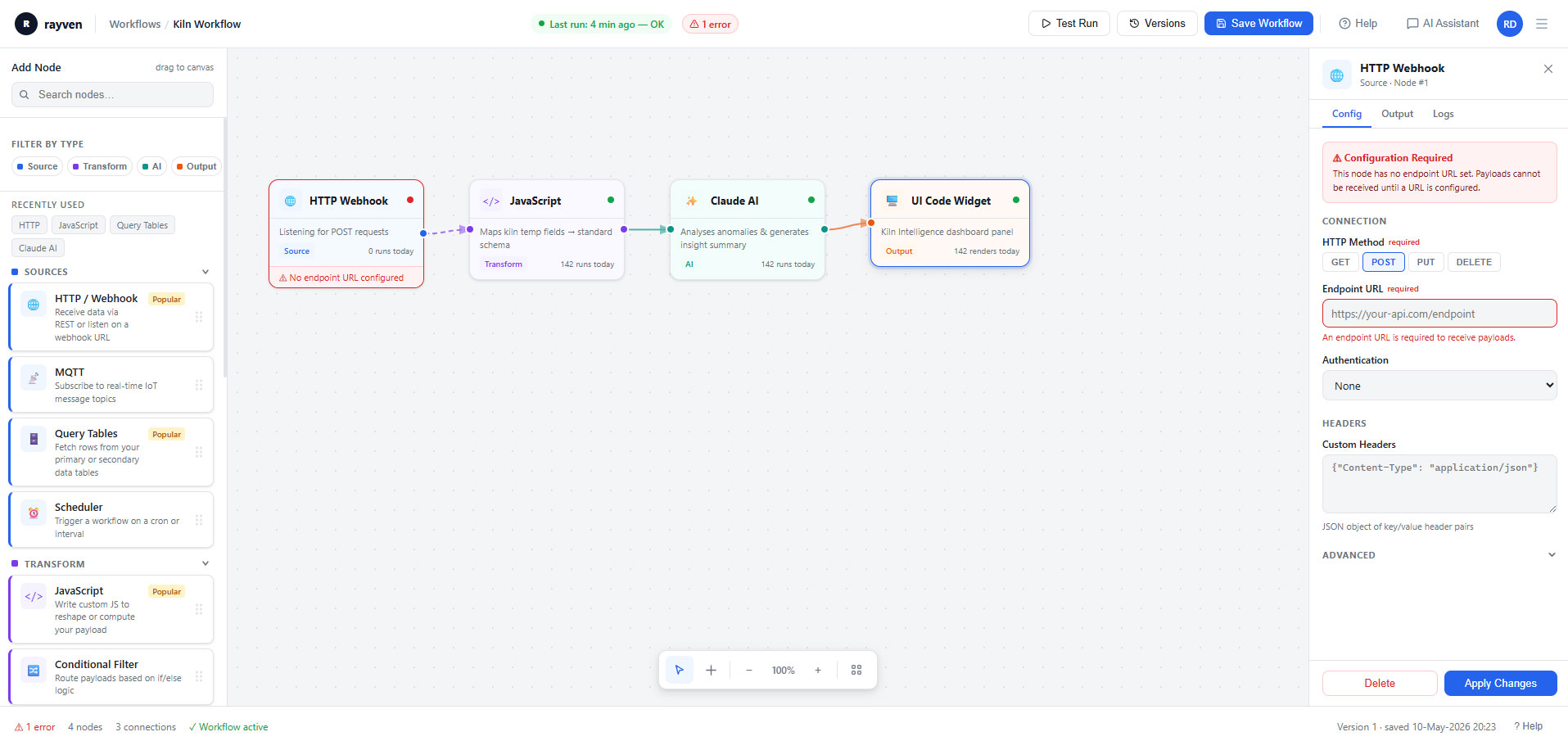
A Salesforce deal closes and sends a webhook POST to Rayven. The workflow trigger fires on receipt. A JavaScript node validates the payload fields, a Query Tables node retrieves the customer record, an AI node generates a personalised onboarding summary, Output to Email sends it to the customer + an Update Tables node sets the onboarding status to active. End-to-end in one automated chain.
Partner automating multi-client operational processes at-scale
An MSP configures per-Label workflow triggers across multiple clients on a shared Rayven instance. Each client's operational data triggers its own workflow instance independently, with Label-based logic routing outputs to client-specific dashboards, alerts + external systems. The MSP delivers fully automated operational processes under each client's own branded portal.
Rayven Workflows + Triggers FAQs:
What is the difference between a scheduled trigger and an event-driven trigger?
A scheduled trigger fires at a fixed interval - every N minutes, hourly, daily. An event-driven trigger fires immediately when data arrives - an MQTT message, webhook POST, form submission or API inbound. Both trigger types are available per workflow node. See the Integration Layer for all input types.
What happens if a trigger fires while a previous run is still executing?
Each workflow instance runs independently. If a second trigger fires before the first run completes, a new instance starts in parallel. Per-UID architecture ensures instances for different entities never block each other. See Real-time Data Processing.
Can I set a workflow to run only during business hours?
Yes. Conditional Filter nodes can evaluate the current time against a configured window and exit the workflow if outside the defined schedule. This provides time-gated execution without separate cron infrastructure. Explore Control + Automation.
Can workflows call other workflows?
Yes. A workflow can trigger a child workflow as a step. This enables modular design - reusable sub-workflows for common logic (alert dispatch, data normalisation, API enrichment) can be called from multiple parent workflows. See all Execution Layer capabilities.
Is there visual debugging for workflow execution?
Yes. The workflow builder shows execution status per node - passed, failed, skipped - with output payloads at each step. This allows rapid diagnosis of logic errors without external monitoring tooling. See Security for audit logging.
Can workflows be paused and resumed?
Yes. Workflows can be disabled and re-enabled without deletion. Scheduled workflows stop firing while disabled; event-driven workflows stop listening. Re-enabling restores full function. See all Execution Layer capabilities.
Can the same workflow run for thousands of different UIDs?
Yes. Rayven's iterative workflow pattern executes the same workflow logic independently for each UID in a dataset. One workflow definition scales to any number of assets, customers or devices. See Unified Data Tables.
How many nodes can a single workflow contain?
There is no fixed node limit. Workflows can include as many transformation, AI, data, logic and output nodes as the use case requires. Complex workflows with 30+ nodes are common in production deployments. See all Execution Layer capabilities.
Can a single trigger branch into multiple independent execution paths?
Yes. After a trigger fires, the workflow can branch - one path writes to the Data Layer, another fires an alert, another calls an API. All branches execute in the same run. Explore Control + Automation.
Can workflows integrate with external orchestration tools?
Rayven workflows are self-contained and do not require external orchestration tools. All scheduling, logic, branching and output are native workflow nodes. For integrations that a pre-built connector does not cover, Custom Integrations fill the gap.
Also in the Execution Layer:
Control + Automation
Write control commands to connected devices, systems + machinery - closing the automation loop from data to action.
Predictive AI / Machine Learning
Deploy Python ML models as workflow nodes - scoring live data and triggering threshold-based actions in real-time.
Gen AI + AI Agents
Chain LLM connector nodes within workflows for document extraction, classification, summarisation + agent-style automation.
Approvals + Exceptions
Build human-in-the-loop approval steps, exception routing + escalation logic into any workflow chain.
Rayven MCP
Give AI assistants like Claude, ChatGPT + Gemini governed, real-time access to your contextualised operational data via the Model Context Protocol.
Ready to automate your operations?
Show us the process you want to automate and we will walk you through how Rayven handles it - from trigger to action.
Join the Shift
Discover the easy way to do something new.
Book a demo with our team and we'll show you exactly how Rayven can work for your environment.